Download the latest stable version for Windows
Download v3.4.0 (Chili)ZIP Version | Older Versions | 26.5 MB (32bit)
About Pot-O Note Pad
Pot-O Note Pad is a powerful, free, and lightweight text editor designed to go beyond the basic functionality of Windows Notepad. Built upon the robust **QScintilla** library, it offers essential features for developers, writers, and anyone needing reliable, fast text editing.
Released as **Freeware** under the permissive **MIT License**.
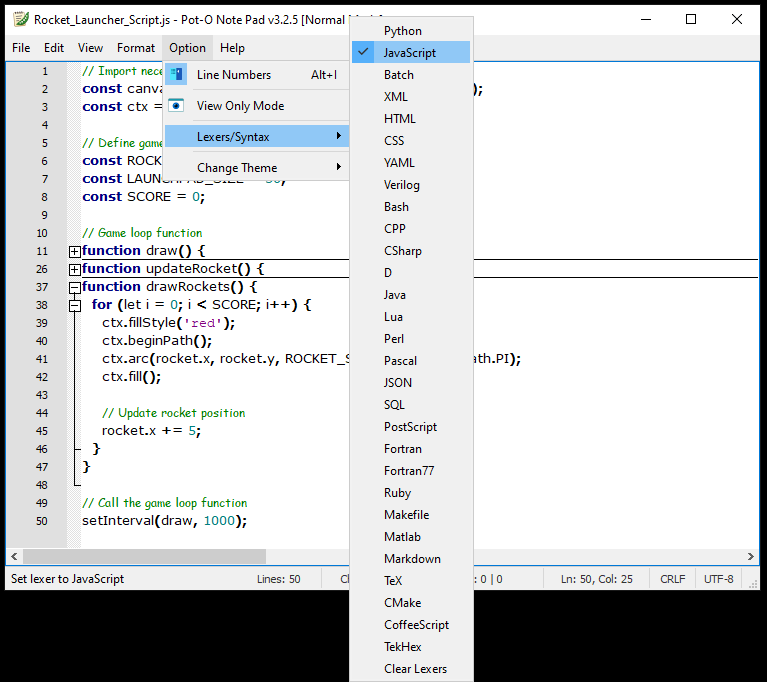 Pot-O Note Pad User Interface showing syntax highlighting in action.
Features (v3.4.0)
- Save as PDF - Easily export your text file as a high-quality, formatted PDF document directly from the menu.
- Syntax Highlighting - Built-in lexers provide professional color coding for various programming languages.
- Clipboard Sanitization (new in v3.4.0) - Automatically cleans copied text to strip unwanted formatting codes and invisible characters upon pasting.
- Reliability Improvements (latest release) - Core stability fixes for Open, Save, and PDF export functionality.
- Familiar Interface - Works just like Windows Notepad, including a useful **View Only** Mode.
- Fast & Lightweight - Loads quickly and uses minimal system resources, built with Python/PyQt5.
- Basic Text Editing - All the standard features you expect: cut, copy, paste, find, replace, line numbers, and text wrapping.
Syntax Highlighting Demo
Thanks to the QScintilla engine, Pot-O Note Pad can identify and highlight syntax elements, making code easier to read:
Supported Languages
The editor supports highlighting for dozens of languages, including:
System Requirements
| Requirement | Minimum | Recommended |
|---|---|---|
| Operating System | Windows 7 (32-bit) | Windows 10/11 |
| Memory | 256 MB RAM | 512 MB RAM or more |
| Disk Space | 100 MB free space | 200 MB free space |
Ready to start editing? Get Pot-O Note Pad now!
Download v3.4.0